Um ótimo plano de projeto só é útil se você puder compartilhá-lo. O LoopGantt exporta um projeto em sete formatos, de um relatório para as partes interessadas a um arquivo de dados para outra ferramenta, e você pode exportar a partir de qualquer visualização do projeto.
Como exportar
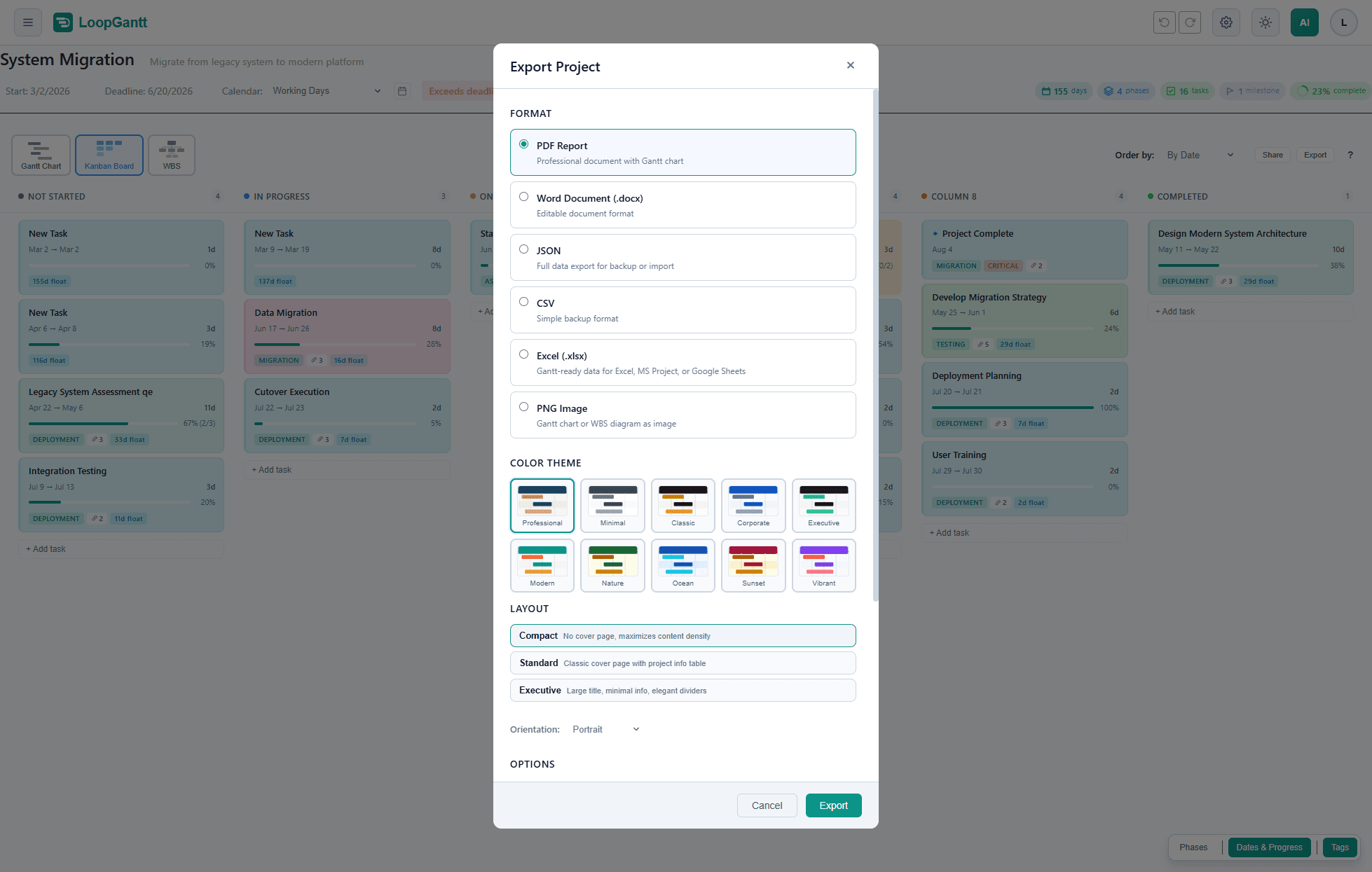
- Abra seu projeto.
- Clique em Exportar na barra de ferramentas do projeto. No celular, toque no ícone de exportação no topo da tela.
- Escolha um formato e ajuste as opções.
- Clique em Exportar. O arquivo é baixado quando estiver pronto.
Formatos e planos
| Formato | O que você recebe | Plano |
|---|---|---|
| Relatório PDF | Um relatório com seu gráfico de Gantt e as seções que você escolher | Free; alguns layouts, temas e o renderizador Vetorial são Pro |
| Documento do Word (.docx) | O mesmo relatório como arquivo do Word editável | Pro |
| Imagem PNG | O gráfico de Gantt ou o diagrama EAP como imagem, ou como arquivo SVG | Free; imagens 4K/5K e SVG são Pro |
| Excel (.xlsx) | Dados prontos para Gantt no Excel, no MS Project ou no Google Sheets | Pro |
| MS Project XML (.xml) | Um arquivo que abre no Microsoft Project 2016 ou posterior, com o cronograma, os vínculos e o calendário | Pro |
| CSV | Uma linha por tarefa, para planilhas e outras ferramentas | Free |
| JSON | Todos os dados do projeto, para backup ou para importar de novo | Free |
Tudo o que está marcado como Pro também está incluído no plano Teams. Se você está no plano Free, escolher uma opção Pro abre a janela de upgrade.
PDF e Word
PDF e Word compartilham as mesmas opções:
- Layout: Compacto (sem capa, o máximo de conteúdo por página; gratuito e o padrão), Padrão (capa clássica com uma tabela de informações do projeto) ou Executivo (título grande e divisórias elegantes). Padrão e Executivo são Pro; você pode abrir uma pré-visualização com dados de exemplo antes de fazer o upgrade.
- Renderizador: Padrão captura o gráfico de Gantt como imagem, o que atende à maioria das visualizações (gratuito e o padrão). Vetorial — Premium gera um gráfico mais nítido e de maior resolução (Pro).
- Tema de cor: dez temas. Profissional (o padrão) e Minimalista são gratuitos; Clássico, Corporativo, Executivo, Moderno, Natureza, Oceano, Pôr do sol e Vibrante são Pro.
- Opções: escolha quais seções incluir: o gráfico de Gantt (com ou sem a lista de tarefas), a tabela de tarefas, os campos personalizados, os marcos, o resumo, o resumo do caminho crítico, o diagrama EAP, as métricas PMP (SPI, folga, previsão) e o painel de saúde (status, ritmo, linha de base). Você também pode adicionar o horário de geração ao rodapé da página.
- Configurações do projeto: um logotipo, o nome e o cargo do responsável e a empresa para os relatórios deste projeto.
Quando o projeto usa recursos, custos ou acompanhamento da gestão avançada, um apêndice com essas tabelas é adicionado automaticamente depois do gráfico de Gantt.
PDFs do plano Free trazem uma pequena linha "Gerado no LoopGantt.com" na parte inferior de cada página; não há marca-d'água. PDFs e documentos do Word Pro não trazem nenhum crédito do LoopGantt.
PNG — Imagem do gráfico
Escolha o Tipo de gráfico: o gráfico de Gantt ou o diagrama EAP. Para o gráfico de Gantt, você também pode definir:
- Incluir lista de tarefas: mostra os nomes das tarefas ao lado das barras.
- Escala de tempo: Ajuste automático (recomendado), Meio dia, Dia, Semana, Mês ou Trimestre.
- PNG Padrão, PNG Premium ou SVG: PNG Padrão é FHD ou QHD (gratuito); PNG Premium é 4K ou 5K, para impressão e telas grandes (Pro); SVG é um arquivo vetorial que você pode ampliar sem limite (Pro).
- Imagem única: uma imagem grande em vez de páginas, para projetos longos.
- Intervalo de datas personalizado: exporte só uma parte da linha do tempo.
O seletor de Tema de cor acrescenta Claro e Escuro, que mantêm as cores das suas tarefas, aos dez temas acima. Imagens do plano Free trazem uma pequena linha "Gerado no LoopGantt.com" abaixo do gráfico.
Formatos de dados
- Excel (.xlsx): uma linha por tarefa com o ID, a EAP, o nível de estrutura de tópicos, o tipo, a duração, as datas, o prazo, as predecessoras, a % concluída, o status, a prioridade, o indicador de caminho crítico, a folga total, os nomes dos recursos, as anotações e os campos personalizados.
- MS Project XML (.xml): o cronograma, as dependências e o calendário, além dos recursos e das atribuições quando a gestão avançada está ativada.
- CSV: as colunas são WBS, Name, Description, Duration (Days), Start Date, End Date, Deadline, Status, Progress (%), Dependencies, Total Float, Free Float, Critical, Milestone, Phase e Priority, mais seus campos personalizados. Os cabeçalhos das colunas estão sempre em inglês, para que outras ferramentas possam lê-los.
- JSON: tudo o que é necessário para reconstruir o projeto: os campos das tarefas, incluindo as cores e os checklists, os tipos de dependência (FS/SS/FF/SF) e os dias de atraso, os campos personalizados e os metadados do projeto. Use-o para fazer backup do projeto, para importá-lo de novo ou para gerar um projeto novo com um assistente de IA (veja Use sua própria IA para gerar um projeto).