See Every Project at a Glance: LoopGantt's New Dashboard and Portfolio Timeline
If you manage more than one project at a time — and let's be honest, who doesn't — you know the feeling. You open your project management tool, click into one project, check on the timeline, click back out, open another project, try to remember what the deadline was for the first one, and somewhere in the middle of all that clicking, you lose the thread.
That's the problem we set out to solve with the latest update to LoopGantt's project dashboard. Not a cosmetic refresh. Not a new color palette. A fundamental change in how you see and understand all of your projects at once.
The Old Dashboard: Functional, but Limited
The previous LoopGantt dashboard did its job. You could see your list of projects, each with a simple progress bar. It was clean, it was dark-themed, and it gave you the basics.
But "the basics" only gets you so far. There was no search. No filtering. No way to compare project timelines side by side. If you wanted to know which project was closest to its deadline, you had to open each one individually and piece together the picture in your head. For someone juggling three or four projects, that's manageable. For someone running eight, ten, or fifteen? It becomes a real bottleneck.
We heard the feedback. Users wanted to spend less time navigating between projects and more time actually understanding where things stood. They wanted project visibility — not just project access.
What's New: A Dashboard Built for Clarity
The revamped dashboard is built around one principle: you should be able to open LoopGantt, glance at your screen, and immediately know the status of every project you're responsible for. Here's what that looks like in practice.
The Project Table
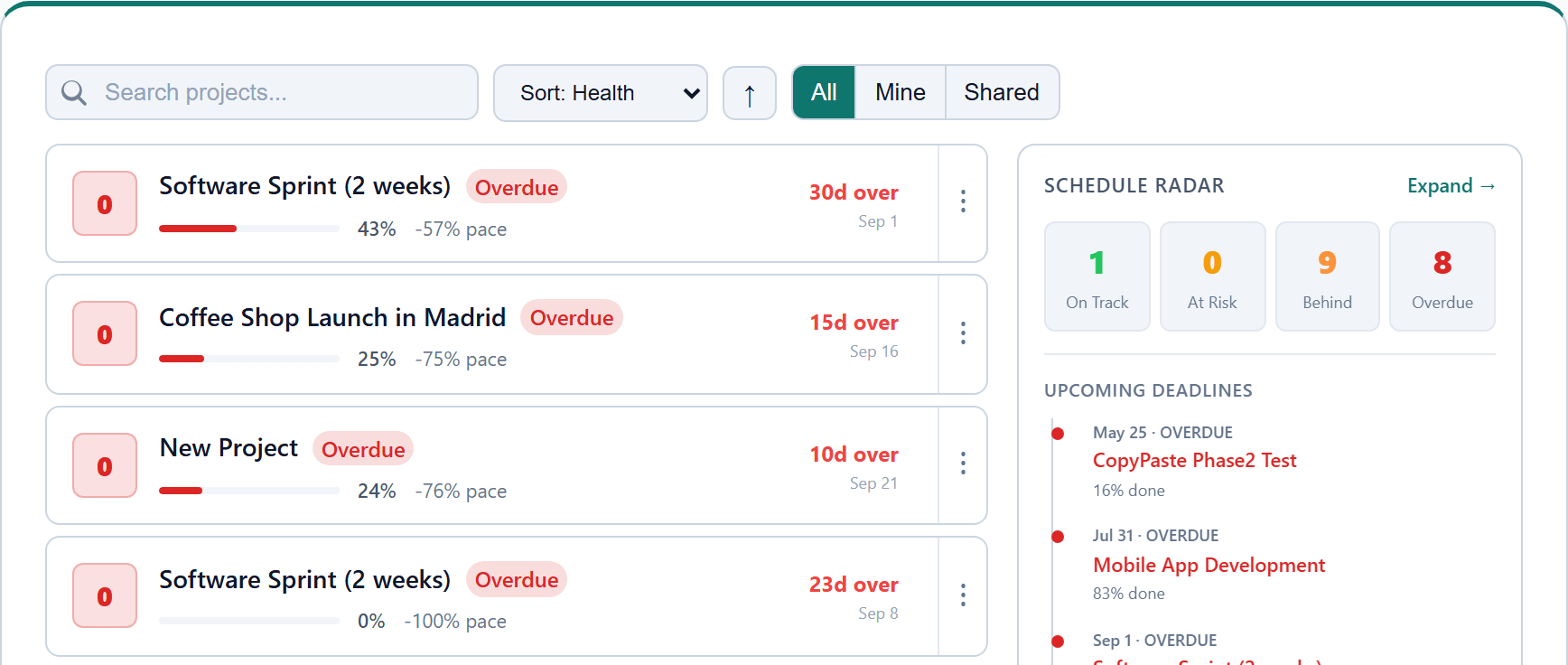
The new default view is a clean, structured project table. Every project gets a row, and every row gives you the information that actually matters: a colored status indicator, the number of tasks completed versus total, a progress percentage, start and end dates, and any relevant labels. No clicking into individual projects just to check on progress. It's all right there.
The colored status indicators are more than decoration. They're designed to give you an instant visual signal. Green means on track. Yellow means attention needed. Red means something's off. Your eye can scan the full list in seconds and land on the projects that need you most.
Search and Filtering
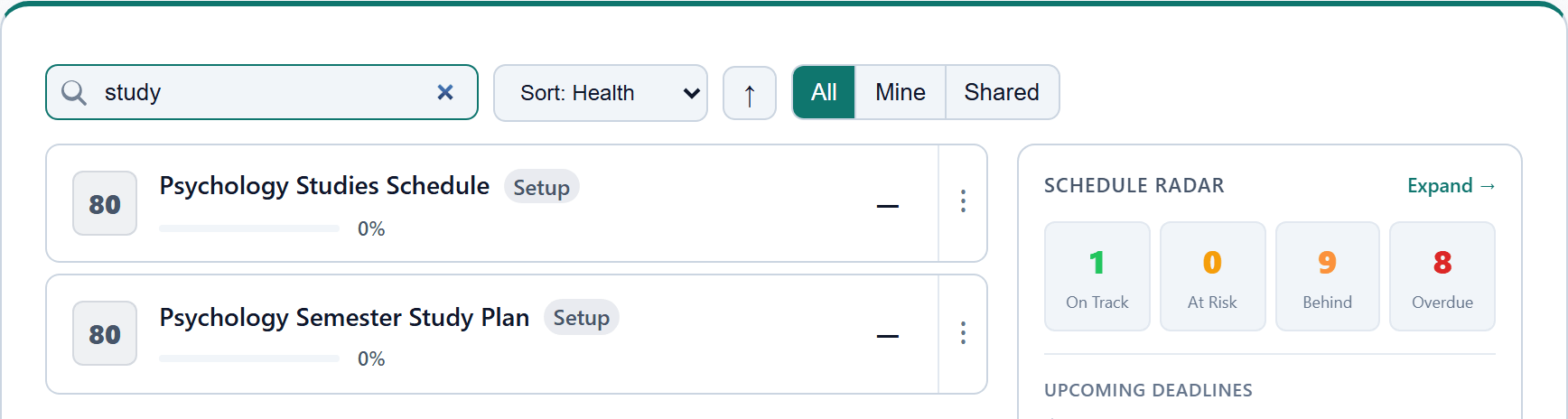
This sounds simple, and it is. But it was one of the most requested features we had on the board. The new dashboard includes a search bar at the top that lets you filter your project list in real time. Start typing a project name, a client name, or a keyword, and the list narrows instantly.
For teams and freelancers who manage a large number of projects — particularly those who organize work by client or department — this is a small feature that saves real time. No more scrolling through a long flat list trying to find the one project you need to check on before a meeting.
Portfolio Timeline: The Big One
This is the feature we're most excited about, and the one that changes how you think about your project workload.
The Portfolio Timeline is a full Gantt-style view that displays all of your projects on a single horizontal timeline. Each project appears as a colored bar stretching across its start and end dates, with milestone markers placed along the way. You can see every project you're running, how they overlap, where the crunches are, and which deadlines are approaching fastest — all in one view.
Think of it this way. The project table tells you how each project is doing individually. The Portfolio Timeline tells you how your entire workload fits together.
This is where project visibility really clicks. You can spot that two major deliverables land in the same week. You can see that one project's crunch period overlaps with another's kickoff. You can identify bottlenecks before they become emergencies and make informed decisions about resource allocation, deadline adjustments, or scope changes while there's still time to act.
For anyone managing a portfolio of projects — whether you're a project manager at an agency, a product lead coordinating multiple workstreams, or a freelancer balancing client deadlines — the Portfolio Timeline gives you the kind of bird's-eye perspective that used to require a separate tool or a very elaborate spreadsheet.
Why Project Visibility Matters More Than Pretty Interfaces
It's easy to get caught up in how a dashboard looks. And sure, the new LoopGantt dashboard looks good — it's clean, it's readable, it uses space well. But that's not the point.
The point is what you can do with it. The point is going from "which project am I behind on?" to knowing the answer instantly. The point is opening your Gantt chart dashboard on a Monday morning and having a clear picture of your entire week, your entire month, your entire quarter — without clicking into a single project.
Project visibility isn't about having more data. It's about having the right data, organized in a way that makes decisions easier. That's what this dashboard update is designed to deliver.
Imagine a simple interface where you can track all your projects, see the velocity of each one, spot the end line approaching, and know at a glance which deadlines are closest. That's not a fantasy. That's the new LoopGantt dashboard.
Create with AI: Start Projects Faster
One more addition worth mentioning. The new dashboard includes a "Create with AI" button that lets you generate a new project structure using artificial intelligence. Describe what you're working on, and LoopGantt will scaffold out a project with tasks, milestones, and a timeline — giving you a starting point that you can refine rather than building from scratch.
It's not a gimmick. It's a practical way to reduce the friction of getting started. We've found that one of the biggest barriers to good project tracking is the setup time. If creating a project plan takes forty-five minutes, people put it off. If it takes two minutes with AI and another ten to customize, people actually do it.
What This Means for Your Workflow
Here's the shift. Before this update, LoopGantt was a great tool for managing individual projects. You could create detailed Gantt charts, set dependencies, track milestones, and collaborate with your team — all of that remains true and keeps getting better.
But with this dashboard update, LoopGantt becomes a tool for managing your entire project portfolio. The difference is significant. Individual project management answers the question "how is this project going?" Portfolio management answers the question "how is everything going, and what should I focus on next?"
That second question is the one that keeps project managers up at night. And it's the one that the new dashboard is designed to answer, clearly and quickly, every time you log in.
Pricing That Stays Simple
One thing that hasn't changed with this update: LoopGantt's pricing. The Pro plan is $5 per month or $45 per year per user — simple, transparent per-user pricing. Team workspaces add roles and Operations at $5 per full member per month. No hidden add-ons — just a straightforward per-user rate for the full experience.
There's also a free plan that gives you access to the core Gantt chart features with PNG and PDF exports (with a small footer credit line). It's a real free plan, not a seven-day trial dressed up as one.
We think pricing clarity is part of project visibility too. You should know exactly what you're paying and what you're getting, just like you should know exactly where your projects stand.
Try It Today
The new project dashboard and Portfolio Timeline are live now for all LoopGantt users. If you already have an account, log in and you'll see the update immediately. If you're new to LoopGantt, you can sign up for free and see the dashboard in action with your first project.
We built this update because we believe project managers deserve better tools for seeing the big picture — not just managing the details. We hope the new dashboard helps you spend less time wondering and more time doing.
As always, we'd love to hear what you think. Your feedback is what drives every update we ship.
Max Turing is a marketing scout at Loopends Studios, the team behind LoopGantt. He spends his days exploring what makes project management tools work — and what makes them fall short.